
Window, Spatial, and Immersive: The Three Ways VPORT Plays on Apple Vision Pro
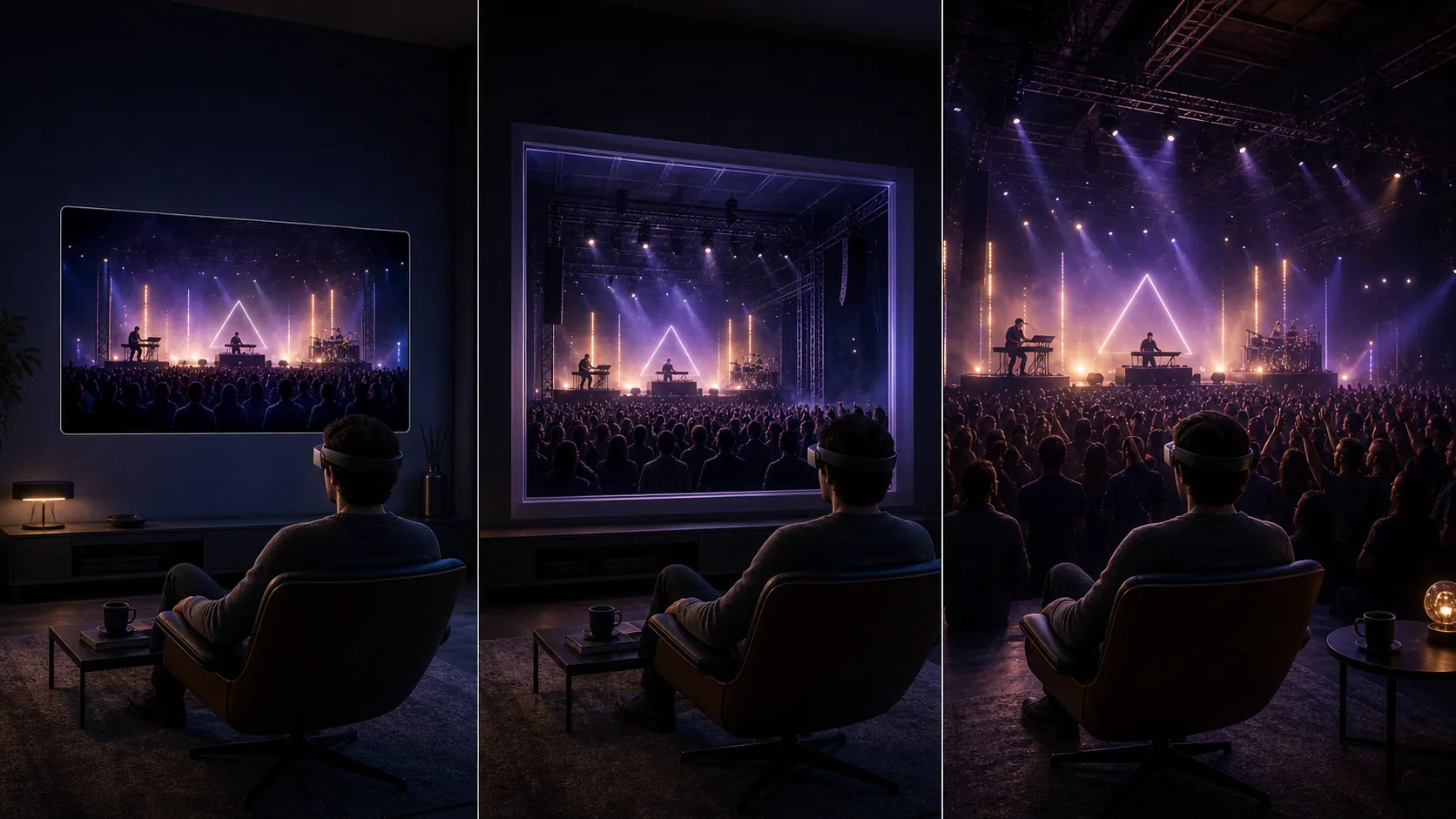
One concert. Three completely different ways to watch it. Same artist, same night, same setlist - but the feeling changes depending on how you let it in. That is the core of VPORT on Apple Vision Pro. Not one playback pipeline, but three. Window. Spatial. Immersive. Each one built for a different moment, a different headspace, a different level of surrender.
A Tuesday-night rewatch on your couch demands something different from a Saturday-night deep dive with the lights off. So we built three modes. Here is what each one actually does - and when to reach for it.
Why Three Modes Instead of One
Because one mode cannot serve every situation.
Sometimes you want the full ceremony - headphones on, lights off, no distractions. Sometimes you are half-watching while you cook. Sometimes you want a quick taste before deciding whether to teleport into the full show. Three fundamentally different use cases. Cramming them into a single playback mode means compromising on all of them.
VisionOS was designed around the idea that content can exist at different levels of presence - from a floating window to a fully immersive environment that replaces your surroundings. VPORT maps directly onto that architecture.
Window mode respects your attention. Spatial mode earns it. Immersive mode demands it.
These are not quality tiers. None of them is the "cheap" version. They are context switches. Different tools for different moments.
Mode 1 - Window (2D, Anywhere You Look)
Window mode is the most familiar. A flat rectangular player floating in your Vision Pro space. Pin it above your desk, tuck it into a corner while you work, scale it up to fill your visual field. Standard 2D. No depth. No head tracking. Just the video, clean and sharp, hanging wherever you put it.
This is the mode for casual consumption. Browsing the VPORT library. Previewing a set you have not seen yet. Rewatching a favorite moment while you handle other things in VisionOS. It coexists with your apps, your messages, your browser tabs. Concert-on-in-the-background mode.
A lot of VPORT content originates from professional 360-degree capture rigs. When that footage plays in Window mode, the system extracts the best forward-facing angle and delivers it as a flat stream. Still professional-grade imagery. Just through a single viewport instead of a full surround.
Window mode also handles something that matters more than people realize: iPhone-captured Spatial Video. Apple gave every iPhone 15 Pro and later the ability to shoot stereoscopic clips with genuine depth data baked in. When those clips land on VPORT, Window plays them flat. Universally compatible, zero friction.
When Window wins: You want the set playing while you multitask. You are scanning the catalog. You are showing someone a clip without asking them to put on a headset. Quick, clean, no commitment.
Mode 2 - Spatial (Depth, Fixed Frame)
Spatial mode is where things get interesting. The player still has a defined rectangular boundary - you are not surrounded by the content - but now there is genuine stereoscopic depth. The stage pushes back behind the screen. The artist reaches forward. Confetti drifts between you and the frame. The image stops being a flat picture and starts feeling like a window into a real room.
This is MV-HEVC territory. Multi-View High Efficiency Video Coding. In plain terms: a video format that encodes two slightly different perspectives - one for each eye - into a single file. Your Vision Pro reads both views and presents them as a single image with real depth. No fake 3D post-processing. No algorithmic guesswork. Actual parallax, captured at the source.
When Apple says "Spatial Video," this is what they mean at the codec level. The depth is subtle - it does not punch you in the face like the 3D movies of the 2010s - but it is persistent. Your brain registers it the way it registers depth in the real world: quietly, continuously, convincingly. After a few minutes in Spatial mode, switching back to Window feels like someone flattened the room.
Where Spatial becomes a step change is mid-distance content. A DJ booth shot. A small-venue performance where the stage is ten feet away. An intimate acoustic set. Scenarios where 360-degree immersion might actually be overkill - the energy is all happening in front of you. But flat 2D undersells the moment. Spatial threads the needle. Presence and depth without losing your peripheral awareness of your actual surroundings.
You stay anchored in your physical space while the performance gains a tangible third dimension. The concert has weight and volume. It occupies space in a way that flat video never does.
For creators on the VPORT platform, Spatial mode is also the sweet spot for professional capture workflows. MV-HEVC files are significantly smaller than full 360-degree streams, which means faster uploads, lower bandwidth requirements, and broader device compatibility. A Spatial video plays beautifully on Vision Pro and degrades gracefully to standard 2D on devices that do not support stereoscopic playback. It is the most versatile format in the stack.
When Spatial wins: Intimate performances. Booth-cam angles. Any content where the action is in front of you and depth makes it feel real. Also the best mode for longer viewing sessions - less fatigue than full immersion, more presence than flat.
Mode 3 - Immersive (Full 360, You Are in the Room)
This is the one. The reason most people Teleport a VPORT experience in the first place.
Immersive mode replaces your entire visual environment. Your living room disappears. The venue appears. You are standing in the crowd, or beside the DJ booth, or at the edge of the stage - wherever the capture rig was placed. Turn your head left, you see the crowd. Turn right, the bar. Look up, the lighting rig and the haze. Look down, the floor sticky with spilled drinks and good decisions.
This is the teleportation experience we talk about constantly, and it is not hyperbole. In Immersive mode, your spatial memory of the event is indistinguishable from having physically attended. People describe it as remembering the show, not remembering the video. That distinction is everything.
Two sub-formats live under the Immersive umbrella, and the difference between them is worth understanding.
360 Mono is a single spherical image mapped around you. One perspective, shared by both eyes. You get full directional awareness - you can look everywhere - but depth perception is limited. The image feels more like being inside a photograph than inside a room. It is still wildly effective for large-scale environments. Stadium shows. Festival main stages. Anywhere the nearest object is fifteen feet away or more. At that distance, your eyes do not rely heavily on stereoscopic cues anyway. Mono 360 handles these scenarios with grace and at significantly lower file sizes.
360 3D (Stereoscopic) is the full package. Two spherical images, one per eye, captured simultaneously. Genuine depth at every angle. When someone leans into the camera frame, you instinctively pull back. When confetti falls, you feel the urge to catch it. The sense of volume is complete and disorienting in the best possible way. This is the format that makes people gasp the first time they try it. It is also the format that demands the most from the capture hardware, the encoding pipeline, and the playback device. VPORT reserves it for flagship content - the sets and venues where maximum presence is non-negotiable.
Here is something we did not anticipate: crowd behavior changes. Not the virtual crowd - the real one. When audiences know the show is being captured for immersive playback, the energy shifts. More spontaneity. More eye contact with the rig. More of the loose, unfiltered moments that make a live show feel alive. The capture format itself influences the source material. We have seen it across dozens of productions. Immersive capture produces better raw footage because everyone in the room understands that someone, somewhere, is going to be standing right here.
When Immersive wins: Flagship experiences. Main-stage sets. The shows you want to remember as places you have been, not videos you have watched. Saturday night, lights off, volume up. This is the mode you came for.
How Smart Defaults Pick for You
You do not have to think about any of this if you do not want to.
When you open content on VPORT, the app reads the source format and your current context, then picks the mode that makes the most sense. MV-HEVC Spatial file? Opens in Spatial. Full 360 capture? Immersive. Vision Pro detects you are in a shared space with other apps open? Window, so it does not yank you out of your workflow.
The logic is simple: match the mode to the content and the moment. No settings menu. No format picker. Tap a show. It plays the way it should.
The system also factors in bandwidth. Shaky connection? VPORT may start in a lighter mode and offer to upgrade once the stream stabilizes. A flawless Window playback beats a stuttering Immersive one every time.
Smart defaults exist so the 90% case just works. The technology stays invisible. That is the goal.
When to Override (and Why You Will Want To)
But you are not always the 90% case.
The mode switcher is always accessible during playback. One tap. A brief fade, a spatial reorientation, and you are in the new mode. Here is when overriding the default is worth it.
You want to preview before committing. Start in Window mode. Scan through the set. Find the moment that hooks you. Then switch to Immersive for the full experience from that timestamp forward. This is how a lot of regular VPORT users navigate the library - browse casually, then go deep when something grabs them.
The content is 360 but you prefer framed viewing. Some people find full immersion too intense for long sessions. Fair. Switch to Spatial or Window and enjoy the same content from a fixed perspective. You are not losing the footage - you are just choosing how much of it surrounds you.
You are showing someone else. Immersive mode is a solo experience. If a friend is sitting next to you and you want to share what you are watching, flip to Window. Now the content is visible to both of you on a shared floating screen. Instant social viewing.
You are chasing a specific vibe. This one is harder to quantify but it is real. Sometimes a set hits differently in Spatial than in Immersive. The depth without the full surround creates a kind of focused intimacy. Like being in a small room with the artist instead of standing in a crowd of thousands. Some users consistently prefer Spatial for downtempo and ambient content, saving Immersive for the big-room energy.
You want to manage fatigue. Full immersion is demanding. After thirty or forty minutes, some people want to pull back. Switching from Immersive to Spatial is like stepping from the dance floor to the balcony - same show, different relationship to it. Ride a two-hour set comfortably by toggling between modes as your energy shifts.
The right mode depends on you - your mood, your context, your tolerance for total surrender. VPORT gives you all three and stays out of the way while you decide.
The mode that matters most is the one you would keep rewatching. Not the one with the highest spec sheet. Not the one that sounds most impressive when you describe it to someone. The one that makes you close your eyes after the set ends and sit with the feeling for a second before you take the headset off.
For some shows, that is Immersive. For others, it is Spatial. For the quick hits and the casual discoveries, it is Window. The whole point of building three modes was to stop forcing a single relationship between you and the music. The concert does not change. But how you let it in - that is yours.
Welcome to the front row. However you want it.