
The VPORT Creator Ladder: Three Cameras, Three Budgets, Three Ways to Film a Concert
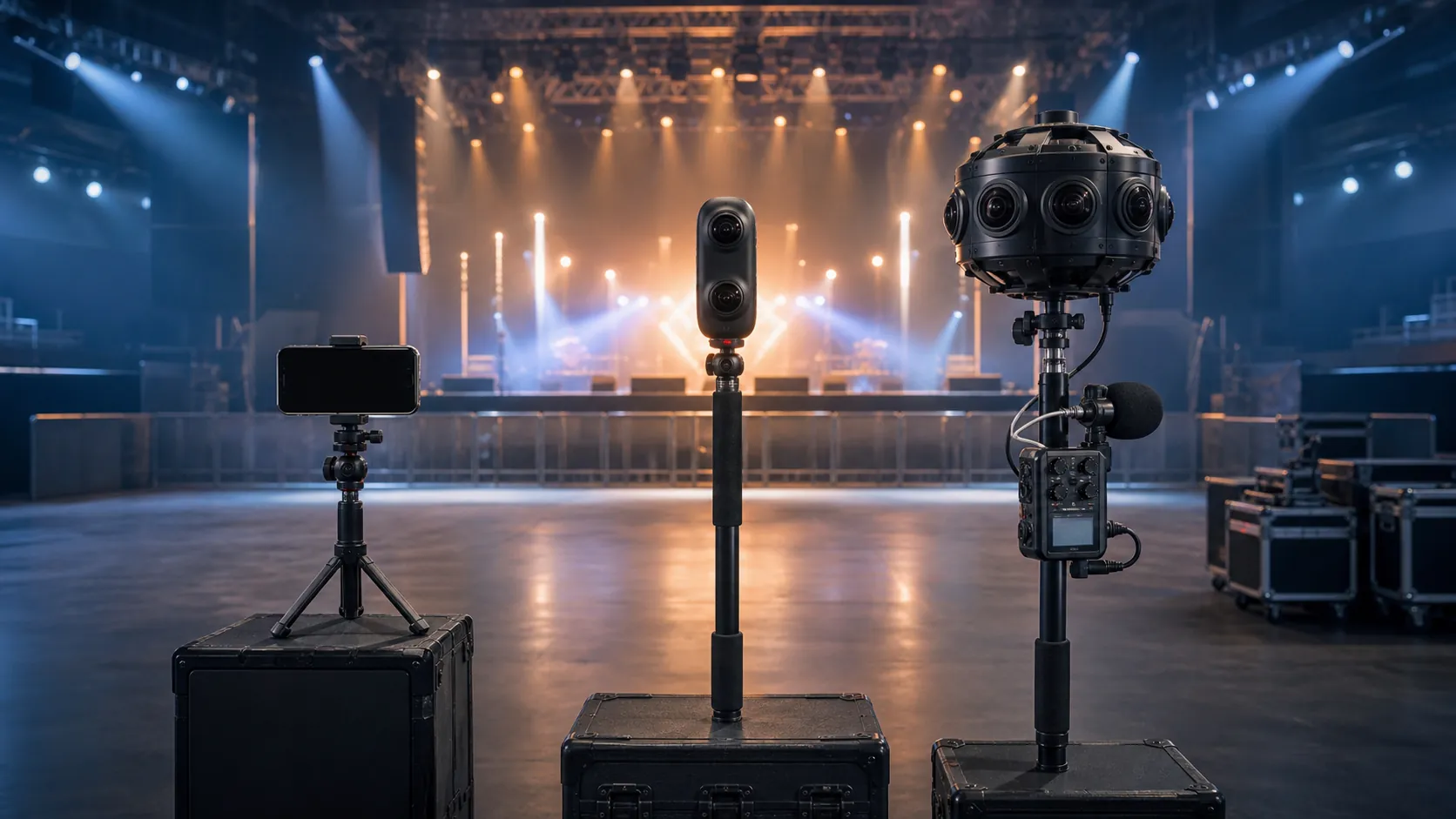
The best camera for filming an immersive concert is the one you will actually bring to the show. Not the one collecting dust on a shelf because you are still learning the software. Not the one you cannot afford. Not the one that requires a crew of four to operate. The one in your bag. Tonight.
That sounds like the kind of thing someone says right before they try to sell you the cheap option. We are not doing that. We are doing something harder: laying out three tiers of capture hardware - from zero-dollar entry cost to a five-figure professional rig - and being honest about what each one produces, who it serves, and when you should level up.
We call it the Creator Ladder. Three rungs. Each one gets you onto the VPORT platform. Each one produces content that real people will Teleport into. The difference is in the ceiling - how immersive the final experience can be, how much post-production you are signing up for, and what kind of audience you are building toward.
If you are reading this, you probably already know that professional spatial video is where live music is headed. The question is not whether to start capturing. The question is where on the ladder to plant your feet.
Why a Ladder Instead of a "Best Camera"
Because "best camera" articles are useless for this medium. In spatial and 360-degree capture, the format you shoot determines the playback mode the viewer experiences. An iPhone and an Insta360 Pro 2 produce fundamentally different types of content. Not better or worse - different in kind.
iPhone Spatial Video produces MV-HEVC stereoscopic footage. Real depth, fixed frame. The viewer looks forward through a window with genuine presence. Powerful for intimate moments. Not 360.
Insta360 X5 produces 360-degree monoscopic video. Full sphere, turn your head, the room wraps around you. No stereoscopic depth - but for large venues where the nearest object is fifteen-plus feet away, mono 360 is indistinguishable from stereo to most viewers.
Insta360 Pro 2 or comparable 8K rigs produce 360-degree 3D. Full sphere, real depth, both eyes getting independent feeds. The format that makes people gasp. Also five to ten times the cost and complexity.
Three cameras. Three formats. Three audiences. That is why it is a ladder.
Tier 1 - iPhone Spatial Video (You Already Own This Camera)
Cost to start: $0 (assuming you own an iPhone 15 Pro or later) Format produced: MV-HEVC Spatial Video (stereoscopic, fixed frame) VPORT playback mode: Spatial (depth, fixed viewing direction)
This is the zero-barrier entry point. If you have an iPhone 15 Pro, iPhone 16, or anything newer, you already own a spatial video camera. Apple baked stereoscopic capture into the hardware. Two lenses. Slightly offset. Recording simultaneously. The result is genuine depth - not fake 3D post-processing, but real parallax captured at the source.
What to Actually Shoot
Not everything. That is the first mistake new spatial creators make - they try to capture the entire show from start to finish. Do not do that. iPhone Spatial Video is a front-facing format. The viewer looks in one direction. Which means your camera placement and your shot selection need to be intentional.
What works:
- DJ booth perspective. Mount the iPhone on a small tripod or clamp on the booth itself, angled slightly downward toward the decks. The viewer gets the artist's-eye view - hands on the mixer, the crowd stretching out ahead, the lighting rig overhead. This is an angle that regular concert footage almost never captures, and it is intimate in spatial.
- Stage wing shots. Side of stage, looking across at the performer with the crowd visible in the background. The depth separation between performer (close) and crowd (far) is exactly what stereoscopic video excels at.
- Backstage and green room. This is the sleeper content category. An artist warming up, tuning, talking to their crew - shot in spatial video, viewed on Vision Pro - feels like you are standing in the room with them. Access the Unaccessible does not always mean the main stage. Sometimes it means the hallway.
What does not work well:
- Crowd-level shots in a packed venue. Too much visual chaos, too much movement, not enough depth separation. The stereoscopic effect gets muddy.
- Handheld while walking. Stabilization helps, but walking footage in spatial video can trigger discomfort. Fix the camera. Lock it down.
- Ultra-wide shots from far away. The stereoscopic depth collapses past about fifteen feet. If the nearest interesting thing in frame is across a large room, you are essentially shooting flat video with extra file size.
Settings and Accessories
Keep it simple. Shoot at the highest spatial video resolution your iPhone supports. Make sure the phone is in landscape orientation - spatial video only records in landscape. Turn off the flash. Turn off live photos. Set the exposure manually if the lighting is dramatic (concerts usually are) to prevent the auto-exposure from hunting between dark moments and bright stage washes.
Accessories worth the money:
- A small tripod or clamp. Joby GorillaPod or similar. Twenty bucks. Non-negotiable. Handheld spatial video is bad spatial video.
- An external battery pack. Spatial video recording drains battery fast. A MagSafe battery on the back buys you another hour.
- A Bluetooth remote shutter. So you can start and stop recording without touching the phone and bumping the angle.
Total accessory cost: $40-$80. Total camera cost: whatever you already paid for your iPhone.
The Honest Limitation
iPhone Spatial Video is not 360. The viewer cannot look around. They look forward, through a stereoscopic window. For casual viewers who have never tried immersive video before, this is still remarkable - genuine 3D on Apple Vision Pro is a step change from flat video. But for the audience that has already experienced full 360-degree immersion on VPORT, Spatial Video can feel limited. It is a window into the room, not the room itself.
That does not make it lesser. It makes it different. And for certain content - intimate moments, backstage access, unique perspectives - it is actually the better format. Not everything needs to be a full sphere. Sometimes a perfectly framed, deeply dimensional window is exactly right.
Tier 2 - Insta360 X-Series 360° Mono ($400–$600)
Cost to start: $400-$600 (camera body) Format produced: 360° monoscopic (full sphere, single perspective) VPORT playback mode: Immersive (full 360, you are in the room)
This is where most serious VPORT creators will land. The Insta360 X-series - specifically the X4 and the newer X5 - represents the sweet spot between accessibility and immersive impact. You get full 360-degree capture in a package that fits in your back pocket.
X5 vs X4: Which One
The X5 is the clear pick for new buyers in 2026. Here is why.
The X5 shoots 8K 360 at 30fps. That is a genuine step up from the X4's 5.7K ceiling. On Vision Pro, the resolution difference is visible. 5.7K stretched across a full sphere means each eye is seeing roughly 2.8K in any given viewing direction. That is watchable but soft. 8K per sphere means roughly 4K per viewing direction. Noticeably sharper. Fine detail in the lighting rig, the faces in the crowd, the texture of the venue - it all comes through.
The X5 also exports Apple Spatial Video natively. Meaning you can shoot 360 and output a front-facing MV-HEVC clip without touching editing software. Dual format from a single shoot. That matters for creators who want to serve both Spatial and Immersive audiences without running two cameras.
The X4 is still a capable camera and can be found used or refurbished for under $350. If budget is genuinely tight, it works. But if you are buying new, the X5's resolution bump and native spatial export make it worth the extra hundred dollars.
Workflow: Shoot to Upload
Before the show: Charge fully. Carry a USB-C battery bank (the X5 runs 60-70 minutes in 8K). Clean both lenses - fingerprints are invisible on the tiny lens but enormous in the stitch. Set to 8K/30fps (not 60fps - double the file size, lower resolution). Set exposure to manual or shutter-priority. Concert lighting changes rapidly; auto-exposure will hunt.
During the show: Mount the camera on a monopod at seven to eight feet. Start recording. Walk away. In 360, you are in the frame. If you are standing next to the camera, you are blocking someone's immersive experience. Set it, start it, leave it. More on placement in our 360 production guide.
After the show: Ingest into Insta360 Studio (free). Stitch the dual-fisheye into equirectangular 360. Trim setup and teardown. Color correct - pull highlights down, push midtones up. Export as equirectangular MP4, H.265 codec, highest bitrate your connection tolerates. Upload to VPORT's Creator Portal with metadata.
Total post time: 30 minutes to an hour. One-person workflow.
When Mono 360 Is Enough (And When It Is Not)
Mono wins at distance. Festival main stages, large clubs, arenas - any venue where the nearest visual element is ten-plus feet from the camera. At that range, stereoscopic depth is negligible. Your brain constructs depth from perspective and contextual cues. Mono delivers both.
Mono struggles up close. A performer leaning within five feet of the camera looks like a detailed cardboard cutout. And in confined spaces - green rooms, narrow hallways - everything feels flatter than it should.
For most concert footage on VPORT, mono 360 from an X5 is genuinely immersive. Viewers turn their heads. They feel present. The format works at a price point a single creator can manage solo.
Tier 3 - Insta360 Pro 2 and 8K 3D Stereoscopic (The Professional Rig)
Cost to start: $5,000-$8,000 (camera body, used/refurbished Pro 2; new professional rigs significantly more) Format produced: 360° stereoscopic 3D (full sphere, genuine binocular depth) VPORT playback mode: Immersive 360 3D (the full package)
This is the top of the ladder. Six or eight synchronized lenses. Stereoscopic image pairs for every viewing direction. The output is 360-degree video with genuine depth - the kind of content that makes people instinctively pull back when someone leans toward the camera.
The Insta360 Pro 2 is the workhorse of this tier. It has been on the market for several years, which means two things: the workflow is well-documented and battle-tested, and you can find used units at significant discounts from the original price. At CES 2026, we saw new professional rigs from Canon and RED entering this space, but the Pro 2 remains the most accessible on-ramp to professional stereoscopic 360.
When This Investment Makes Sense
Be honest with yourself before spending five grand.
It makes sense if:
- You are a professional videographer or production company adding immersive capture to your service offerings. The camera pays for itself in two or three gigs.
- You are capturing flagship content for a major venue or festival that wants the absolute best immersive output. This is the format that VPORT reserves for marquee content - the sets that get featured, promoted, and talked about.
- You are building a catalog. If you plan to capture ten, twenty, fifty shows over the next two years, the per-show cost of a Pro 2 drops fast. Amortize it.
It does not make sense if:
- You are filming your first immersive concert. Start at Tier 1 or Tier 2. Learn framing, placement, and audio capture on forgiving hardware before committing to a complex rig.
- You are a solo operator who cannot dedicate time to post-production. Stereoscopic 360 stitching is not one-click. It requires attention, especially around the stitch lines where the six lens perspectives blend together. Misaligned stitches break immersion worse than mono ever could.
- You do not have a clear path to recouping the cost. This is professional equipment. Treat it like a professional investment.
Hire vs Buy
For most creators considering Tier 3, the right first move is to hire - not buy.
Rental houses in most major cities stock the Pro 2 and comparable rigs. A one-day rental runs $300-$500 depending on the market. Rent one for a show. Learn the workflow. See if the output quality justifies the complexity for your specific use case. If you are shooting one or two shows a month, renting is cheaper than buying for the first year.
If you are shooting weekly or running a permanent venue installation, buying makes sense. Factor in accessories: heavy-duty tripod, monitoring tablet, extended-capacity SD cards for all six slots, and a workstation with GPU power for stitching.
The Post-Production Reality
Stitching six or eight lens perspectives into a seamless stereoscopic sphere is non-trivial. Concert environments are punishing - moving stage lights create mismatched exposures across lens boundaries, performers crossing stitch lines can split in half, and haze obscures alignment references.
Expect two to four hours in post per hour of raw footage. This is not a "shoot and upload" workflow. It is a production pipeline.
The payoff is content that sits at the top of the VPORT library. Full stereoscopic 360. The format that most faithfully recreates the feeling of being inside the venue. When it is done right, there is nothing else like it.
Which Tier Reaches Which Audience
This is the part most camera guides skip. The hardware you choose does not just determine the technical quality of your footage. It determines who watches it and how they experience it.
Tier 1 (iPhone Spatial) reaches the broadest audience in terms of accessibility. MV-HEVC Spatial Video plays on Apple Vision Pro in Spatial mode, but it also degrades gracefully to standard 2D on any screen. Your content works everywhere. The trade-off is that the immersive ceiling is lower - no 360, no full-room presence. Your audience is anyone with an interest in depth-enhanced video, including the millions of Apple Vision Pro owners who have never tried full immersion.
Tier 2 (Insta360 X-Series 360) reaches the core VPORT audience - people who own a spatial computing headset and want to be teleported into a room. They turn their heads. They look around. They are there for the full experience. This is the audience that chose VPORT specifically because flat video was not enough. Mono 360 serves them well. They are not pixel-counting - they are presence-seeking.
Tier 3 (Stereoscopic 360 3D) reaches the most demanding viewers and the editorial spotlight. VPORT features, curated collections, and top-of-library placements tend to prioritize stereoscopic 3D content because it delivers the highest presence. If you are trying to build a reputation as a professional immersive creator, Tier 3 is the format that gets noticed. It is also the format that gets shared, discussed, and referenced when people talk about the future of live music documentation.
There is no wrong tier. But know who you are building for.
Decision Tree: Which Camera Should You Buy?
Let's make this practical.
Start here: Have you ever filmed a 360 or spatial video before?
-
No. Start at Tier 1. Use your iPhone. Shoot three to five shows. Learn what works in spatial - framing, camera placement, lighting challenges, audio sync. Upload to VPORT. Watch your own footage on Vision Pro. Understand the medium before you invest in specialized hardware.
-
Yes, and I want full 360 immersion. Go to Tier 2. Get the Insta360 X5. The price-to-quality ratio is unmatched in 2026. A single camera, a monopod, and a USB-C battery bank give you a complete concert capture kit for under $700.
-
Yes, I'm a working professional, and I need the best output possible. Consider Tier 3. But rent first. Do two or three shoots with a rented Pro 2 before committing to a purchase. Make sure your post-production workflow can handle stereoscopic stitching without turning every project into a week-long ordeal.
How many shows will you shoot this year?
- One to three. Tier 1 or Tier 2. Minimal cost, maximum learning.
- Four to twelve. Tier 2. The X5 pays for itself by the fourth show.
- More than twelve. Tier 2 daily driver plus a Tier 3 rig for flagship captures.
What does your audience care about most?
- Backstage access and unique perspectives. Tier 1. The iPhone goes where bigger cameras cannot. The clips that go viral on VPORT often win on access, not resolution.
- Being inside the room. Tier 2. Full 360 presence. The core VPORT promise, delivered reliably.
- Maximum immersion and depth. Tier 3. The top of the format stack.
Start Climbing
The Creator Ladder is not about reaching the top rung as fast as possible. It is about starting. The worst immersive footage is the footage you never shot because you were waiting for the right camera.
If you have an iPhone in your pocket, you are already at Tier 1. Film something tonight. A local show. A rehearsal. A friend's DJ set in a living room. Upload it. Watch it back on a headset. Feel the difference between flat and spatial. Then decide if you want to go further.
The VPORT Creator Portal is open. The tools are documented. The audience is growing. The only thing missing is the content that you - specifically you, from your city, in your scene, at the shows that only you attend - can capture.
Three cameras. Three budgets. One ladder. Pick a rung. Start filming.