
How to Check a Concert Video's Format Before You Watch
"Spatial," "360," "3D," and "VR" are not interchangeable labels. A listing can use one of those words accurately and still leave out the fact that matters most to a viewer: what will the player actually let you see and hear?
This checklist is for the moment before you start a concert. It helps you verify whether the source is framed or panoramic, monoscopic or stereoscopic, compatible with your player, and paired with ordinary or spatial audio. For the underlying definitions, start with our technical guide to spatial video, 360 video, and VR.
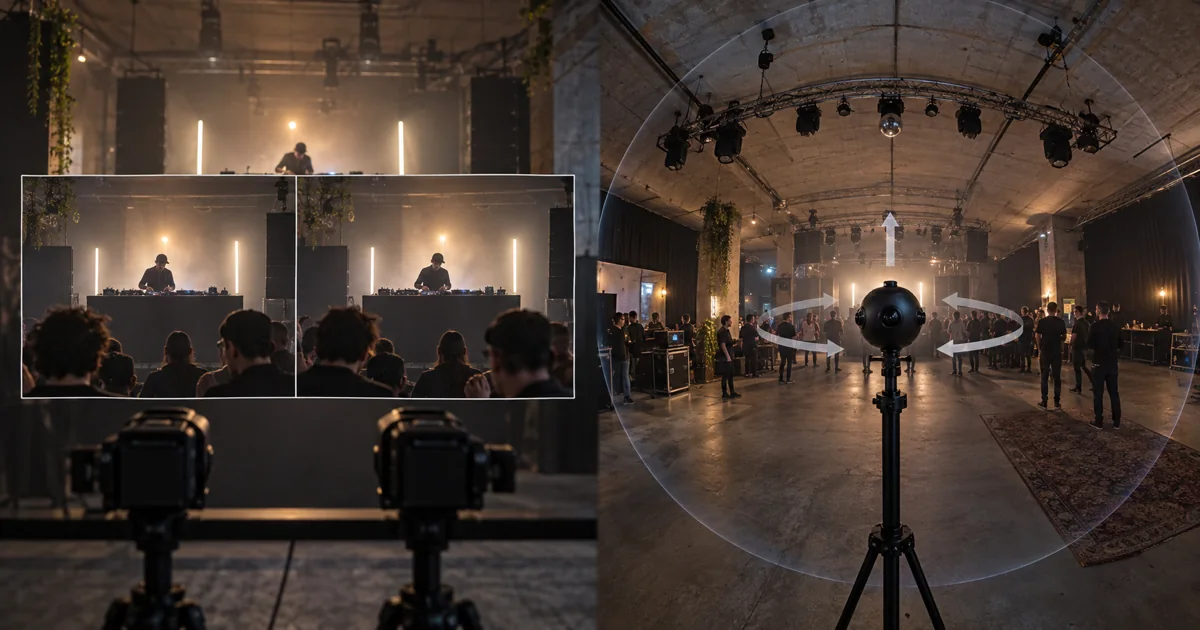
Fictional technical-rehearsal scene generated with AI to explain capture geometry. It is not a VPORT production, partner venue, or documentary image.
The Five Checks That Matter
1. What part of the room was captured?
A framed video records what is inside a rectangle. A 180-degree or 360-degree video records a wider projected view that a compatible player can let you explore.
YouTube's current 180-degree and 360-degree guidance describes spherical video as a separate upload and playback format. On YouTube, a processed 360-degree video can be rotated with the player controls, mouse, or keyboard. That behavior confirms panoramic playback on YouTube, but it does not prove the source has stereo depth.
Ask the listing or provider to name the projection explicitly:
- Framed or rectilinear: You watch a bounded view of the performance.
- 180-degree: You can look across a forward-facing hemisphere when the player supports it.
- 360-degree: You can look around the recorded camera position in every direction when the player supports it.
None of these labels means you can walk through the venue. Captured panoramic video normally keeps you at the camera's recorded position.
2. Do the two eyes receive different views?
Field of view and stereo depth are separate properties.
Apple documents spatial video as MV-HEVC with separate stereoscopic layers for the two eyes. Apple also documents iPhone spatial capture at 1920 by 1080 pixels and 30 frames per second in SDR. That is normally a framed stereo view, not a full sphere.
Panoramic video can be mono or stereo:
- Monoscopic 360: Both eyes receive the same spherical image. You can look around, but the file does not contain a distinct eye view for stereo depth.
- Stereoscopic 180 or 360: The file contains separate eye views as well as a panoramic projection. You can look around and perceive captured stereo depth when the player handles both correctly.
YouTube treats rectangular 3D, VR180, and 360 3D as distinct stereo cases. A headset, a 360 label, or a draggable view does not create a missing second-eye image.
3. Will your player interpret the file correctly?
A capable headset cannot recover projection or stereo metadata that the file or delivery path omitted.
Apple's current Vision Pro guidance says visionOS 26 can natively present supported 180-degree, 360-degree, and wide-field-of-view files. Apple Projected Media Profile metadata helps Vision Pro choose the correct formatting. A file without that profile may need optimization, and Apple recommends checking with the camera maker if distortion or immersive playback is wrong.
Apps can use their own playback paths as well. VPORT's current Vision Pro media-player guide distinguishes native floating playback for standard and spatial footage from immersive playback for supported APMP, 180-degree, or 360-degree presentations. The event's actual source metadata and the installed app still determine which presentation is available.
Before paying or planning a watch session, verify the exact event in the exact app and device you intend to use. A general platform capability does not prove that a particular concert, format, or rendition is available in your account.
4. What does the resolution number describe?
Do not compare resolution labels without checking the projection and eye layout.
The Insta360 Pro 2 specification, for example, lists different maximum frame dimensions for monoscopic 360 and 360 3D capture. Those pixels are distributed across a panorama and, for stereo, across separate eye views. The resulting number is not directly comparable with the resolution of a framed iPhone spatial clip.
Resolution also does not prove sharp playback. Stitching quality, compression, camera placement, exposure, motion, player support, network delivery, and the headset's display all affect what you see.
5. Is the audio actually spatial?
Spatial audio is not an automatic property of spatial or 360 video.
YouTube's spatial-audio specification requires a supported Ambisonics layout, channel order, normalization, sample rate, codec, and metadata. Other platforms can use different formats and requirements.
If the audio matters to your decision, look for a specific audio format or a documented player capability. Do not infer directional audio from the words "immersive video," from a camera model, or from the fact that the picture can rotate.
A Fast Decision Table
| What you want | Source facts to confirm | What the label alone does not prove |
|---|---|---|
| Depth inside a framed performance | Separate left-eye and right-eye views; compatible stereo playback | A full view around the room |
| Freedom to look around | 180-degree or 360-degree projection; compatible panoramic playback | Stereo depth |
| Both look-around and depth | Panoramic projection plus separate eye views; compatible stereo-panoramic playback | Sharpness, comfort, or spatial audio |
| Directional sound | Named audio format and documented player support | That the video is stereo or panoramic |
| Reliable playback on your device | Exact device, OS, app, source format, metadata, and private test | Availability in every app, account, or event |
Red Flags in a Concert Listing
Pause before relying on a listing that:
- says only "VR concert" without naming the projection or eye views;
- treats "spatial" as proof that the viewer can look behind the camera;
- treats "360" as proof of stereoscopic depth;
- presents an 8K label without explaining whether it covers a frame, panorama, or stereo pair;
- assumes spatial audio because the image is panoramic;
- names a camera but not the delivered file and player path;
- promises an app, event, price, catalog item, or playback mode without a current public source or an exact-device test.
The useful question is not which buzzword sounds most immersive. Ask what was captured, how it was encoded, what the player recognizes, and what you can verify on the device in front of you.
Creators and production teams can continue with our spatial-video event checklist, which covers rights, camera placement, audio, post-production, and end-to-end testing.