
Techno in VR: The Room Test for Choosing an Immersive Set
Searching for techno in VR can return several experiences that look similar in a headline but feel completely different in a headset. A flat concert video shown on a virtual screen, a stereoscopic performance with depth, and a 180-degree or 360-degree recording are not interchangeable. Neither are stereo, binaural, and head-tracked spatial audio.
The useful question is not whether a listing uses the word immersive. It is whether the recording preserves enough of the room to make the set legible: where the booth sits, where the audience gathers, how the camera occupies the floor, and whether sound remains anchored to the scene.
This guide turns that question into a practical room test. It does not promise that a particular artist, club, festival, or recording is available on VPORT. Catalogue, price, region, device support, and access terms should always be checked on the current event listing.
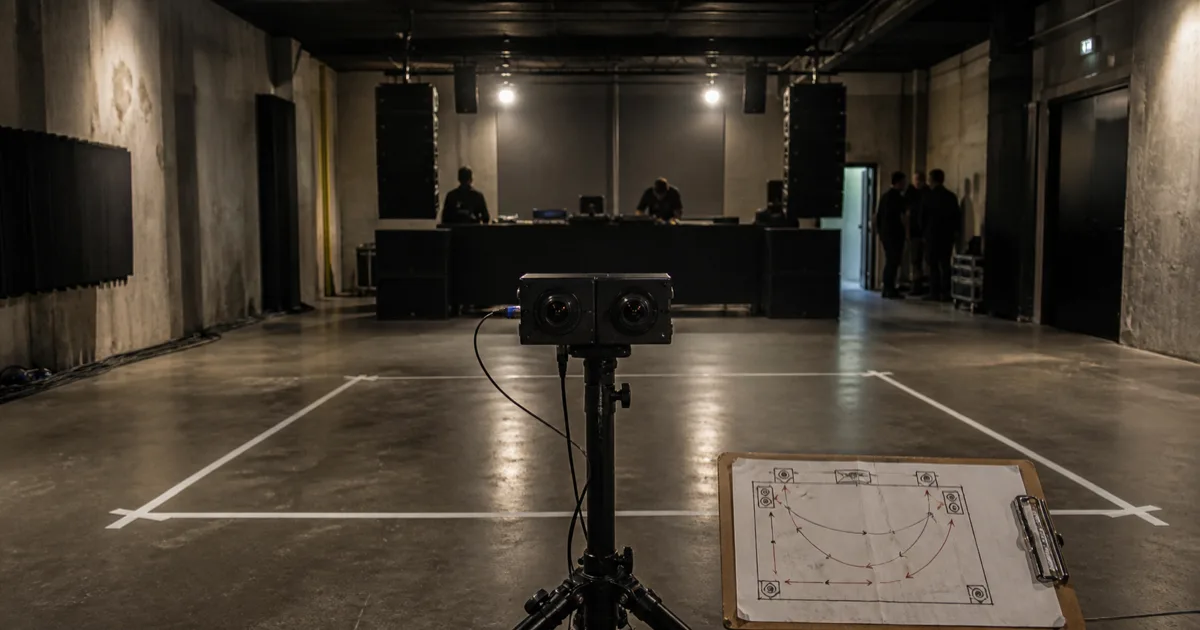
Original editorial image: a fictional pre-show technical check created to explain camera placement and room-audio evaluation. It does not depict a VPORT recording, venue, artist, or partner.
First, Decode What “In VR” Means
A headset does not automatically turn ordinary video into immersive media. The source format and player determine what you can actually see.
Apple's current visionOS documentation distinguishes among 2D, 3D, and fully immersive video. Apple also describes Apple Immersive Video as a separate 180-degree format captured with Spatial Audio in the Apple Vision Pro user guide. Meta's official Quest Browser overview similarly separates ordinary 2D sites, screen-based 3D, and immersive WebXR experiences.
That gives you the first verification rule: look for a named presentation format, not a broad adjective.
- Screen or window: a conventional video surface inside the headset.
- Stereoscopic or spatial video: left-eye and right-eye views create depth, usually within a bounded frame.
- 180-degree immersive video: the scene covers the forward field of view, with room to look around within that hemisphere.
- 360-degree video: the viewer can inspect the full surrounding scene; depth may still be monoscopic or stereoscopic.
None of these formats is automatically best. A carefully framed stereoscopic shot can communicate a booth better than a poorly placed 360-degree camera. The listing should tell you which format you are buying or opening.
The Techno Room Test
Techno is unusually sensitive to room decisions. The booth may be visually minimal, the audience may be the main source of movement, and the most important information can live between the stage and the back wall. Use these three tests before treating a recording as an immersive set.
1. Can You Read the Booth-to-Floor Relationship?
Start with the camera position. A useful viewpoint should make at least two parts of the room understandable at once: the performer or booth, and the audience area responding to it.
Check the preview or stills for:
- a stable horizon at a plausible listener height;
- an unobstructed view of the booth and its nearest audience zone;
- enough distance to understand the scale of the room;
- no dominant railing, speaker cabinet, lighting stand, or empty barrier blocking the center of the frame; and
- safe placement that does not appear to put equipment inside normal crowd movement.
This is not a demand for a front-row camera. A position slightly behind the most active floor area can provide a better read on the room because it preserves both crowd movement and the booth sightline. The important thing is intentional placement.
2. Does the Audio Stay Attached to the Scene?
The phrase spatial audio is useful only when the source and playback behavior are clear. Apple's visionOS spatial-audio sample demonstrates the basic test: an audio source can remain located in space as the listener changes position or turns.
For a recorded set, listen for stable relationships rather than exaggerated effects:
- the main system should not appear to jump sides during a head turn;
- booth monitoring, crowd response, and room ambience should occupy plausible directions;
- speech or a localized sound should remain connected to its visible source; and
- the audio should stay synchronized with visible transients such as lighting hits or audience reactions.
Directional stability does not prove that a headset reproduces the physical force of a club sound system. It tells you whether the recording and player preserve a coherent sound field. Our spatial audio listening test goes deeper on fixed versus head-tracked playback, sync, and troubleshooting.
3. Does the Recording Preserve a Set, Not Just a Moment?
A techno set develops over time. A short highlight can demonstrate resolution or camera quality, but it cannot show whether the recording preserves transitions, pacing, and the room's changing response.
Before paying or creating an account, verify:
- the published runtime;
- whether the item is live, on demand, a replay, or a short preview;
- whether seeking, pausing, or resuming is supported;
- the access window and any expiry date; and
- whether the listing names the performer, event, rights holder, or official publisher.
The broader on-demand VR concert checklist covers device support, accessibility, completeness, and source verification. For techno, runtime deserves extra weight because continuity is part of the work.
A Fast Scorecard Before You Press Play
Use this table when a listing gives you several technical claims at once.
| Check | Useful evidence | Warning sign |
|---|---|---|
| Viewing format | 2D, stereoscopic, spatial, 180, or 360 is named | “Immersive” is the only format description |
| Camera position | Preview shows booth, floor, and a stable horizon | Obstruction, extreme height, or no room context |
| Audio | Stereo, binaural, multichannel, or spatial behavior is stated | “3D sound” with no source or playback detail |
| Set continuity | Runtime and live/on-demand state are explicit | Only a highlight is shown, with no full length |
| Device path | Supported headset, app, browser, and fallback are named | “Works in VR” with no device instructions |
| Access | Price, account, region, and viewing window are visible | Terms appear only after checkout or sign-in |
| Provenance | Official publisher or rights context is identifiable | Reuploaded footage or unclear authorization |
If the first three rows are unclear, the recording has not yet passed the room test. A high resolution number cannot repair missing format, placement, or audio evidence.
Apply the Test on Apple Vision Pro and Meta Quest
The same recording can be presented differently across devices, so check the current product instructions as well as the media listing.
On Apple Vision Pro, VPORT's current media-player guide says the app chooses a native floating or progressive immersive presentation from footage metadata and device capability, with a floating-player fallback if an immersive space cannot open. That is why a VPORT event should be judged from its specific footage and presentation, not from the headset name alone.
On Meta Quest, VPORT's current watching guide says Watch in VR is available for supported 180-degree, 360-degree, or stereoscopic footage. VPORT's public Meta Quest overview separates Theater, Spatial, and Immersive modes and says the available mode depends on how the performance was captured and published. Meta's own Browser documentation makes the broader distinction between a 2D page, screen-based 3D, and an immersive WebXR experience.
For either device, verify the current listing, current guide, and current playback option together. Hardware compatibility is necessary, but it is not evidence that every item uses the same projection or audio format.
What a Good Techno VR Listing Should Tell You
A trustworthy listing should let you answer these questions without guessing:
- What video format is this recording?
- Is it monoscopic or stereoscopic?
- What audio format is included?
- Which devices and player modes support it?
- How long is the set, and is it complete?
- Is it live, on demand, or available for a limited window?
- Who published or authorized it?
- What will it cost before playback begins?
If the answers are missing, wait. If they are present, use the room test: read the booth-to-floor relationship, listen for stable directional cues, and confirm that the runtime preserves enough of the set to matter.
That is the honest standard for techno in VR. The room does not need to be copied perfectly. It does need to remain understandable.